Why RAM Overclocking Gives the Most Performance:
Benchmarks & Real Latency Gains
Overclocking RAM and tightening subtimings doubles memory bandwidth and cuts latency by 35%. While GPU overclocks add a few average frames, memory tuning stabilizes 0.1% lows and eliminates frametime spikes in CPU-heavy games.
Memory Bottlenecks Kill Frametime Consistency Before CPU Cores Max Out
Stock RAM speeds and loose XMP subtimings throttle modern CPUs. Even with high average FPS, micro-stutters happen whenever the CPU stalls waiting for data from memory banks.
AIDA64 Memory Bandwidth Benchmark: Stock vs Manual Overclock
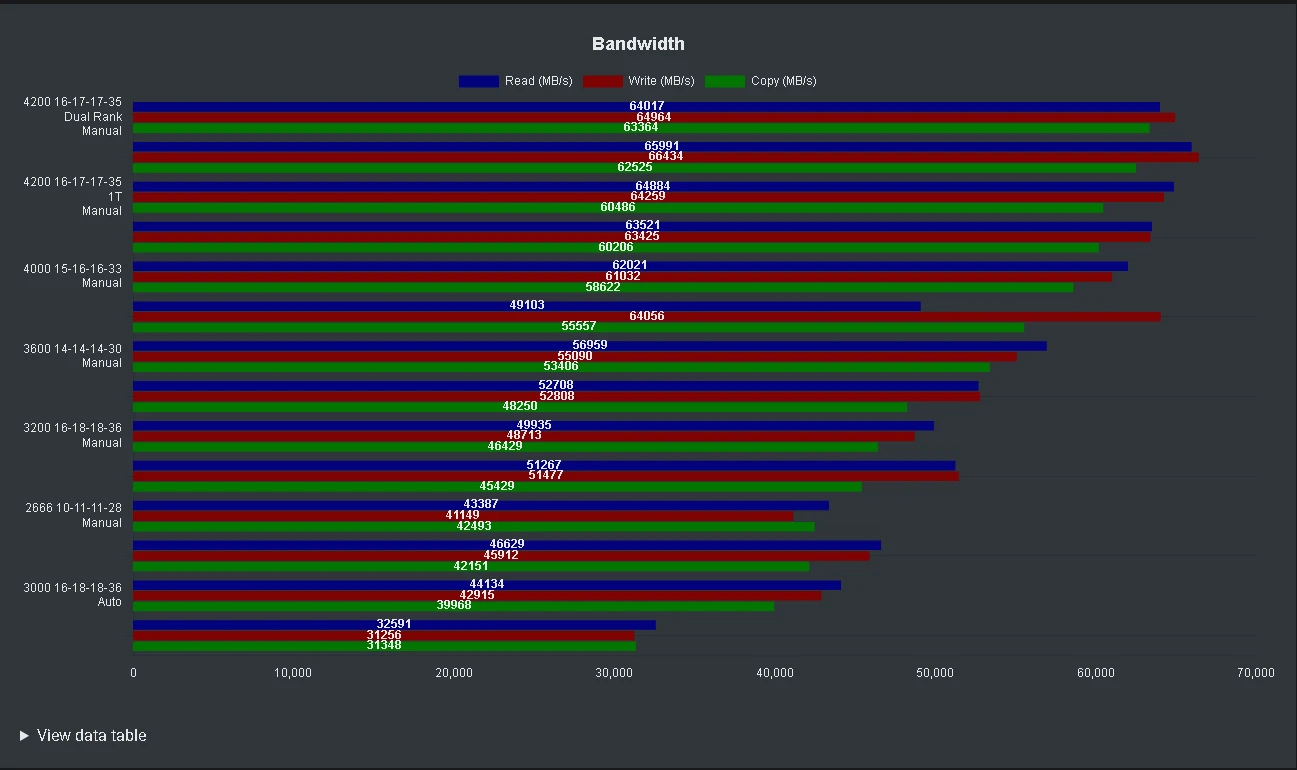
Real benchmark scaling from the MemTestHelper testing suite: Stock DDR4 (bottom) clocks 32,591 MB/s Read / 31,256 MB/s Write. Tightened 4200 MT/s Dual-Rank manual tuning (top) hits 65,991 MB/s Read / 66,434 MB/s Write.
How 1-on-1 BIOS & Kernel Calibration Optimizes RAM Overclocking Performance
When calibrating RAM Overclocking Performance across the DDR4 & DDR5 Dual-Rank / Single-Rank Memory Architecture stack, generic Windows registry scripts fall short because they cannot change motherboard UEFI memory training, CPU voltage-frequency curves, or hardware interrupt routing around AIDA64 Bandwidth Benchmark / DDR4-4200 Dual-Rank vs DDR4-2133 Stock. During a live 1-on-1 remote AnyDesk session, we benchmark your baseline system using CapFrameX and LatencyMon, find the hardware and OS bottlenecks, and hand-tune your BIOS, RAM sub-timings (tRFC, tREFI, tFAW), and GPU settings. Related guides: XMP vs EXPO and Memory Subtiming Tuning.
Every session starts and ends with a CapFrameX and LatencyMon run in your own game, so you see your real before-and-after numbers on your own PC. Results depend on your hardware and what was wrong with it. If the numbers show no improvement, you get a 100% refund.
1,000+ competitive gaming PCs calibrated live 1-on-1 via AnyDesk • 100% Anti-Cheat Compliant
Trusted by 1,000+ competitive players.
Real messages from players after their 1-on-1 AnyDesk session with y1assine.

"fixed all the fps drops i was getting in apex hot drops. guy is super patient, explained everything live on anydesk and tracking feels so much smoother now. definitely recommend"

"overclocked my dualsense to 1000hz and isolated usb interrupts. 0 stick drift feeling, crosshair micro-adjustments are instantaneous on pc."

"was paying hone $10/mo for basically useless registry scripts that broke windows update. yassine did full bios memory subtimings via anydesk for $35 one-time. night and day difference."
// WHAT WE TUNE DURING THE LIVE SESSION
-
BIOS Memory Frequency FCLK / UCLK 1:1 Sync
1.Frequency & Gear Ratio Optimization
Finding the highest stable memory clock while keeping Intel Gear 1 or AMD Infinity Fabric (FCLK) coupled 1:1 with zero desync penalty.
-
Refresh Timings -35ns Latency
2.tRFC & tREFI Refresh Compression
Dropping Row Refresh Cycle (tRFC) to the thermal limit of your memory ICs and maxing tREFI so banks stay open for game draw calls.
-
Subtiming Tightening Max Burst Bandwidth
3.tFAW, tRRD & Turnaround Tertiary Timings
Setting tFAW to 16, locking tRRD_S/tRRD_L at 4, and tuning read-to-write turnaround pairs for clean row activation without bus stalls.
-
Stability Verification 0 Errors Guaranteed
4.Karhu, TM5 & Y-Cruncher Stress Testing
Running multi-threaded memory tests across all memory ranks to guarantee 100% stability with zero silent memory corruption or game crashes.
Ready for Flat Glass-Smooth Frametimes?
Every system is calibrated live via AnyDesk by Yassine. We strip DPC latency, eliminate micro-stutters, and dial in memory sub-timings. If your system does not feel measurably faster with lower input delay, you receive an immediate 100% refund.
// FREQUENTLY ASKED QUESTIONS
Why does RAM overclocking help 0.1% lows more than a CPU core overclock?
Isn't turning on XMP or EXPO in BIOS enough?
Is memory overclocking safe for daily gaming?
How do you tune my RAM remotely?
// RELATED OPTIMIZATION GUIDES
XMP vs EXPO
XMP vs EXPO explained: what the memory profiles do, which one to use on Intel and AMD, how to enable XMP, EXPO or DOCP in the BIOS, how to check your RAM speed, and whether it is safe.
Memory Subtiming Tuning
Double your 0.1% low FPS by tuning RAM subtimings (tRFC, tFAW, tREFI). Professional 1-on-1 AnyDesk PC optimization by YTUNE for flat $35 with money-back guarantee.
RAM Stability Testing
How to properly test RAM stability after enabling XMP/EXPO or overclocking: TestMem5 with anta777 config, Karhu, OCCT, how long to test, heat testing and what to do with errors.
Frametime Consistency
Double your 0.1% low FPS and eliminate micro-stutters. Hand-calibrated memory sub-timings, Windows scheduling, and timer tweak cleanup for $35 via AnyDesk.